Dipping toes in AOT compilation
In Brazil we have a developer bubble on Twitter and people like to interact in there. One day, a guy created a back-end challenge and asked people to join the fun. A couple of editions happened already and in the last one I played around with multiple .NET solutions; AOT compilation was a common thing to see!
If you dip your toes in AOT compilation you’ll have to be familiar with some concepts before.
Managed and unmanaged code
The .NET framework has multiple technologies (ASP.NET for web, WinForms for desktop, EF for ORM), including the Common Language Runtime, usually abbreviated to CLR - the .NET runtime.
A runtime, which is a programming language and framework agnostic term, it’s the environment responsible for basically executing your high-level code into low-level code (along with other features like memory management, type checking and exception handling). When writing C#, you won’t have to worry about memory allocation/deallocation, stack management, type safety, etc… however, these concepts still exist, and they’re managed by the runtime! This is called managed code.
When writing C/C++, you’ll have to worry about pretty much everything related to management - it’s an unmanaged code. The program compilation is just a binary that the OS loads into memory and starts.
This is the whole beauty of managed code. Instead of writing in beep-boop…
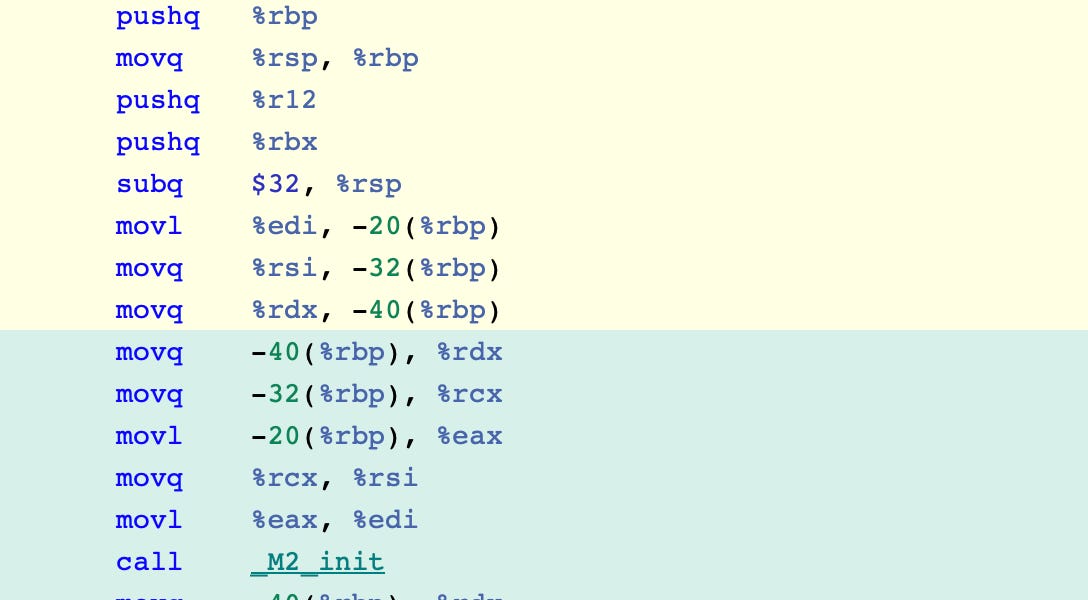
…you’ll write a little more in human.
At the end of the day, the runtime it’s simply (but not a simple) an engine that abstracts these managements that, when made manually, would commonly result in crashes. That’s why low-level languages have little, if any runtime.
Intermediate Language
One of the many .NET framework technologies are programming languages. Today, we have 3 of them: the popular and cool C#, F# and Visual Basic (old and uncool).
As every high-level language, they need to be translated into machine code. Instead of translating each of these high-level languages into binary code directly, each programming language compiler (note: not the runtime) translates the high-level code into an abstraction layer called Intermediate Language (IL) or sometimes called Common Intermediate Language (CIL).
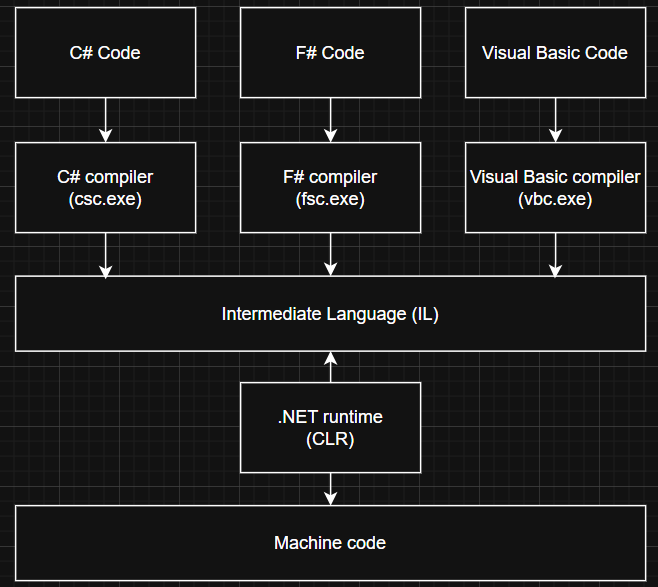
The compiler of C#, for instance, can usually be found at C:\Windows\Microsoft.NET\Framework64\[version]\csc.exe.
This abstraction layer makes the runtime programming language agnostic. The only runtime domain is the Intermediate Language, independently from which language it was originally compiled.
Since the Intermediate Language it’s the only language to be translated into native code, there’s no need for each programming language compiler to adapt its source code for specific CPU architectures - the CLR does that job with the abstraction layer, the Intermediate Language.
Now, what’s AOT compilation?
AOT means Ahead-of-Time compilation and it is one of the multiple compilation strategies there are - each one of them having its own advantages and disadvantages.
When you publish a .NET Web API without any explicit compilation strategy, for instance, .NET will compile your application as Just-In-Time compilation, aka “JIT” compilation. That’s the default compilation strategy for most (if not all) .NET applications.
dotnet publish -c Release -o /publish
In JIT compilation, the IL (or the JVM bytecode in Java) is translated into machine code at runtime - that means each chunk of IL code will be translated only when it is actually reached (note: JIT compilation will always use an intermediate language to translate it to machine code. If it would use a high-level language directly - like AOT does (we will get there) -, the cost of speed would be much higher because these intermediate languages will always be lower level).
Thus, high-level languages compilers such as the csc.exe will translate high-level code to Intermediate Language, a lower-level version of the code that makes it easier to translate it to machine code. Translating the IL to machine code is now the runtime role, not the compiler role. At runtime, you choose which compilation strategy you want for translating IL to machine code.
Important to remember that there are multiple CPU architectures out there and any set of instructions that you need to execute must be adapted for the CPU architecture the code it’s going to run. In .NET, this adaption is made in the runtime. That’s why you can run IL code in any CPU architecture since the host has the .NET runtime configured.
Now if JIT compiles bytecode into machine code on demand and uses the runtime to adapt the machine code for specific CPU architectures, AOT does it in a different way: like the name itself suggests, the compilation process is made ahead of time, which is during build-time rather than during run-time. That means IL is translated into machine code when you build your project for the first time. Thus, you must specify the CPU architecture up front, because the produced binary already contains instructions for that target (the app it’s mostly self-contained and does not require a JIT compiler at runtime now):
dotnet publish -r win-x64 -c Release
AOT compilation in .NET
To build a .NET application using AOT, you’ll first have to enable it in the project file
<PropertyGroup>
    <PublishAot>true</PublishAot>
</PropertyGroup>
and then build it with the specified CPU architecture as already shown above:
dotnet publish -r win-x64 -c Release
When you build your application using AOT, .NET produces it as a self-contained app. Here, you can read some advantages and disadvantages about it and its limitations too.
Conclusion
As most things in computer science, each compilation strategy brings it’s own pros and cons. IMO you’d usually not worry about these things unless you’re working in a high-performance focused application - which was the case of the back-end challenge I mentioned!
I’d compare benchmarks between both compilation strategies but now I have a Defect to work on and a manager to please!